
Call or Text: +1 (208) 425-2990
Email: Sales@DroneSprayPro.com

DJI Agras PDF Downloads: Manuals and Safety Guides
I start with the DJI Download Center and match the aircraft’s exact model, such as the T50 before downloading PDFs. T25 and T25P are different models - a similar name isn’t enough.
Here’s my checklist for getting the right files ready for field use:
- Download the right guides: User Manual, Safety Guidelines, and any battery, charger, maintenance, or component guides listed for your equipment.
- Check each PDF: Confirm the model, English language, revision, and publication date.
- Read before use: Find inspection, cleaning, charging, and service instructions. The Quick Start Guide alone isn’t enough.
- Keep copies offline: Save current files by model, archive older versions, and review Release Notes before firmware changes.
For U.S. use, I also check FAA requirements, pesticide-label directions, and state licensing rules. <u>Manuals don’t replace legal requirements.</u> If a document is unclear, I ask DJI or model-specific support before proceeding.
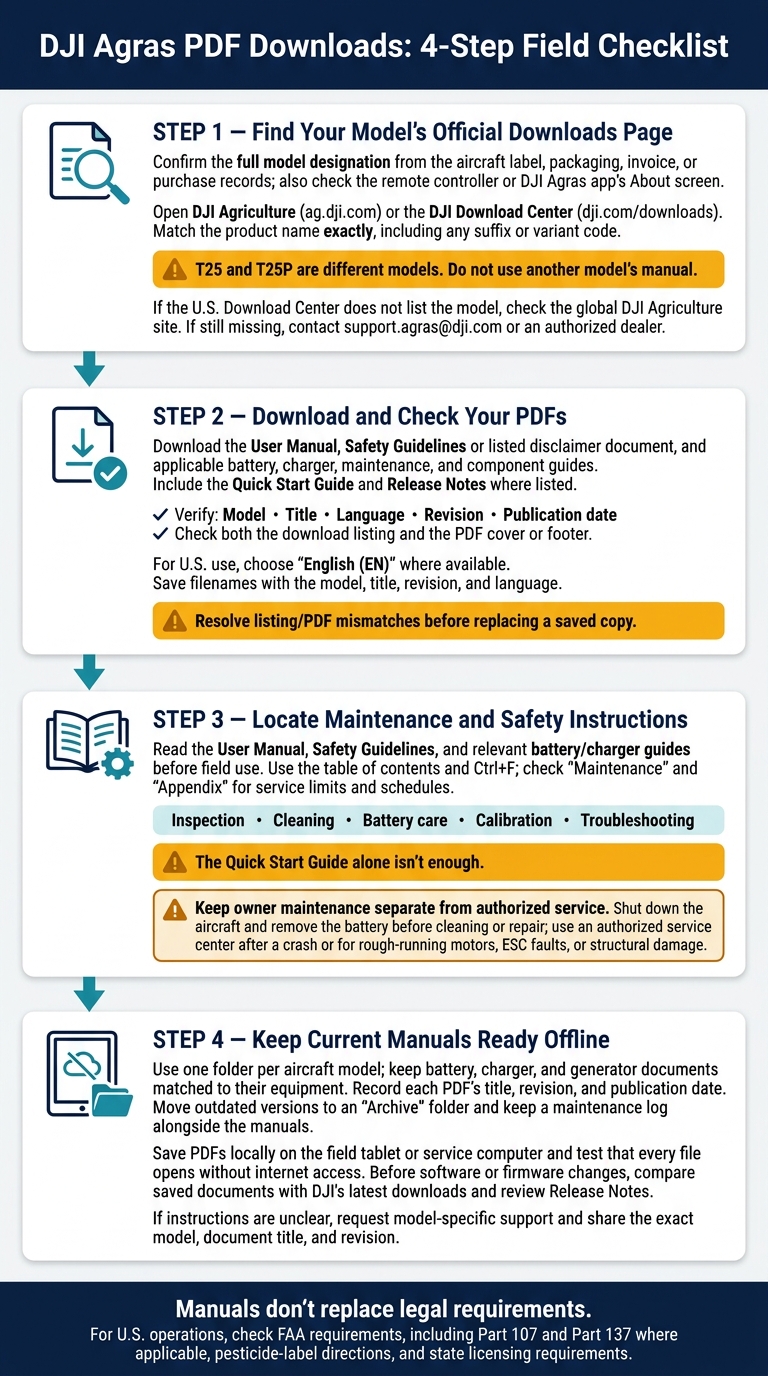
DJI Agras PDF Downloads: 4-Step Field Checklist
1. Find Your Model’s Official Downloads Page
Once you’ve confirmed your model, open its DJI Agriculture or Download Center page. DJI groups documents by product, and the files available may differ by model and region.[1]
Check the Exact Aircraft Model
Confirm the full model designation using the aircraft label, packaging, invoice, or purchase records.[1][4] Also check the model shown on the remote controller or in the DJI Agras app’s About screen.[2]
Match the Model to Its Downloads Page
Make sure the product name on the Downloads page exactly matches your records, including any suffix or variant code.[4]
T25 and T25P are separate model designations, so they should not be treated as interchangeable.[4]
If the U.S. Download Center doesn’t list your model, check the global DJI Agriculture site. Still can’t find it? Email support.agras@dji.com or contact an authorized dealer with the exact model designation. Do not use another model’s manual.[1][4]
sbb-itb-3b7eef7
2. Download and Check Your PDFs
With the correct model page open, download only the PDFs that match your aircraft and installed equipment.[1]
Check the model, title, language, revision, and publication date in the listing. Then confirm those details on the PDF cover or footer. Save each file with the model, title, revision, and language in its filename.[1]
Choose the Right Aircraft and Component PDFs
Use this table to match each task to the right PDF.
| Document name | When to use it | Purpose |
|---|---|---|
| User Manual | Operation and maintenance | Aircraft instructions and troubleshooting. |
| Quick Start Guide | Assembly and flight preparation | Basic hardware and setup instructions. |
| Safety Guidelines or the listed disclaimer document | Before operation and during crew training | Safety precautions, limits, and responsibilities. |
| Release Notes | Firmware updates or troubleshooting | Changes, fixes, and compatibility. |
| In the Box | Unboxing and inventory checks | Supplied equipment checklist. |
| Component guides, where listed | Battery care, charging, spraying, or spreading | Component setup, use, and care. |
Look for separate component documents. Don’t assume the aircraft manual covers everything. After downloading, read the maintenance and safety sections before field use.
Check the Language and Revision
Choose English (EN) for U.S. use. Language availability varies by model.[1]
Before replacing a saved copy: Confirm the exact aircraft or component model and the latest applicable document revision. If the listing and PDF details disagree, resolve the mismatch before overwriting your current file.[1]
3. Locate Maintenance and Safety Instructions
Once you’ve downloaded the right PDFs, go straight to the maintenance sections. Use the Safety Guidelines, User Manual, and battery/charger guides for maintenance, charging, transport, and spray-system handling. The Quick Start Guide for a high-capacity drone like the DJI Agras T50 alone isn’t enough.[1][2]
Find Inspection, Cleaning, and Battery Procedures
Open the official manual’s table of contents, then use Ctrl+F to search for the task. Check “Maintenance” and “Appendix” for service limits and schedules. If one search term doesn’t work, try a related term.
| Task | Relevant document | Search terms |
|---|---|---|
| Inspect arms, locks, propellers | User Manual | “Inspection,” “Arm Lock,” “Propeller” |
| Clean the liquid system | User Manual | “Flush,” “Cleaning,” “After Use” |
| Battery handling and storage | Battery Safety Guidelines; charger guide | “Alcohol,” “Storage,” “Corrosion,” “Pins” |
| Check spray accuracy | User Manual | “Flow Meter Calibration,” “Tare,” “Weight Calibration” |
| Find faults and service requirements | User Manual; maintenance guide, where available | “Troubleshooting,” “Replacement,” “Authorized Service” |
Keep owner maintenance separate from authorized service. Shut down the aircraft, such as the DJI Agras T40, and remove the battery before cleaning or repair. Use an authorized service center after a crash or if you find rough-running motors, ESC faults, or structural damage.[1]
Follow Manual Limits and U.S. Rules
Follow both the manual’s limits and legal requirements. DJI manuals don’t override FAA rules, including Part 107 and Part 137 where applicable. Before spraying, follow pesticide-label directions and state licensing requirements.[3] Keep these pages marked for field checks.
4. Keep Current Manuals Ready for Field Use
Save Offline Copies and Track Revisions
Once you’ve downloaded the correct PDFs, save them where crews can open them without an internet connection.
Use one folder per aircraft model to keep manuals matched to the right hardware. Include the current User Manual, Safety Guidelines, Quick Start Guide, Release Notes, and component guides.[1][3] Keep battery, charger, RTK dongle, and generator documents with the equipment they cover.[2][3]
Record each PDF’s title, revision, and publication date in a consistent format. Move outdated versions to an Archive folder, and keep a maintenance log alongside the manuals to track flight hours and cleaning routines.[1]
Save the files locally on the field tablet or service computer, then check that every PDF opens offline before heading to a job.[1] Before changing software or firmware, compare your saved documents with DJI’s latest downloads.[1][2]
Ask About Model-Specific Training and Support
If a manual is unclear, ask for model-specific support that matches the exact PDF revision. When contacting Drone Spray Pro for training or support, share the aircraft’s exact model, plus the document title and revision you’re using.[3]
Before updating software or firmware, check the latest Release Notes and confirm any model-specific questions with support.[1][2]
Conclusion: Check Your Manuals Before Use
Before use, visit DJI’s official Downloads page to verify your exact model, English (EN) language, and document revision. Then download the aircraft, battery, and charger guides.
Keep current PDFs available offline and use the official manual as your field reference. Confirm maintenance steps and part numbers before any repair or replacement. Recheck DJI’s listings after hardware or software changes, and update your saved copies whenever DJI revises the documents.
FAQs
How can I tell if a manual matches my firmware?
Before downloading a manual or installing updates, check your current firmware version in your control app’s profile or settings menu [1]. Then visit the official download page and confirm that the manual’s document version matches your aircraft’s model and firmware version. This helps you operate the aircraft safely and correctly [1].
What if DJI’s English manual is older than other versions?
Start with the official documentation on DJI’s website for your specific model, including safety protocols and maintenance schedules.
If the English manual is older than versions in other languages, check the latest firmware release notes and notifications in the DJI Agras app. These updates often contain the most current operating guidance and safety requirements, regardless of when the manual was published.
Which manual applies after I replace a component?
Check the official manual for your exact DJI Agras model before starting repairs or replacing parts [1]. Review the procedures and safety instructions, then confirm part numbers are compatible before ordering or installing replacements [1].
After replacing mechanical or system components, such as pumps, recalibrate the spraying system through the DJI AGRAS App. New parts often have different flow characteristics [2].