Call or Text: +1 (208) 425-2990
Email: Sales@DroneSprayPro.com

How Drone APIs Connect to Farm Software
Drone APIs simplify farming by automating the transfer of drone data - like crop imagery and thermal maps - into farm management software. This process saves time, reduces manual effort, and helps farmers make faster decisions. For instance, APIs can send georeferenced data directly to your system within minutes, enabling tasks like early pest detection or irrigation adjustments.
Key Takeaways:
- What APIs Do: Act as a bridge between drones and software, automating data workflows.
-
Precision Farming Benefits:
- Boosts efficiency by 15–20%.
- Cuts water use by up to 30%.
- Reduces farm management time by 40%.
-
Connection Methods:
- Manual Uploads: Best for areas with limited internet.
- Real-Time API Connections: Ideal for quick decisions but needs strong connectivity.
- Middleware: Simplifies integration for mixed equipment fleets.
By using APIs, farmers can streamline operations, create variable rate maps, monitor crops in real-time, and automate tasks like spraying or irrigation. Whether you’re managing a single drone or a mixed fleet, APIs are the backbone of modern farming.
What Drone APIs Are and How They Work in Agriculture
API Basics: What They Are and How They Function
APIs, or Application Programming Interfaces, act as the bridge between drone hardware, sensors, and farm management software. They ensure data flows seamlessly between these components, allowing for automated processes and real-time updates [1][9].
Using standard protocols like REST and MQTT, along with data formats such as JSON, XML, GeoJSON, or CSV [4][9], APIs enable drone-captured imagery and maps to be processed instantly by your software. This means that after a drone completes its flight, georeferenced data is delivered to your farm management system within minutes - ready for immediate analysis. This kind of speed is crucial for tasks like identifying early pest infestations or tweaking irrigation schedules based on up-to-date soil moisture readings.
By automating data handling, APIs set the foundation for advancements in precision farming.
How APIs Support Precision Farming
In precision agriculture, APIs eliminate manual data handling by automating workflows [1]. For instance, farm management software can trigger drone missions automatically, based on factors like crop growth stages or ideal weather conditions.
The efficiency gains are impressive. Over 70% of top agri-tech companies now rely on APIs to integrate real-time farm data, and API-driven systems can cut farm management time by up to 40% [9]. When drone data is combined with on-ground tools via APIs, productivity can increase by as much as 30% [4]. This means quicker detection of crop stress and more precise variable rate applications.
APIs also allow you to incorporate specific agronomic data directly into your decision-making. For example, drone APIs can deliver NDVI mosaics to monitor crop health, stand counts to assess plant emergence, tassel counts for corn, and thermal maps for irrigation planning [7][8]. This data is already georeferenced and formatted, making it easy to overlay on field maps and generate equipment prescriptions.
As Carson Weaver, Senior Sales Account Executive at FlyGuys, explains:
"You build the intelligence. We'll fetch the data. That's the partnership" [1].
sbb-itb-3b7eef7
Webinar: From Sensors to Science - A Research Grade Drone Imaging Workflow for Agricultural Research
3 Ways to Connect Drone APIs to Farm Software
Drone API Integration Methods for Farm Management Systems
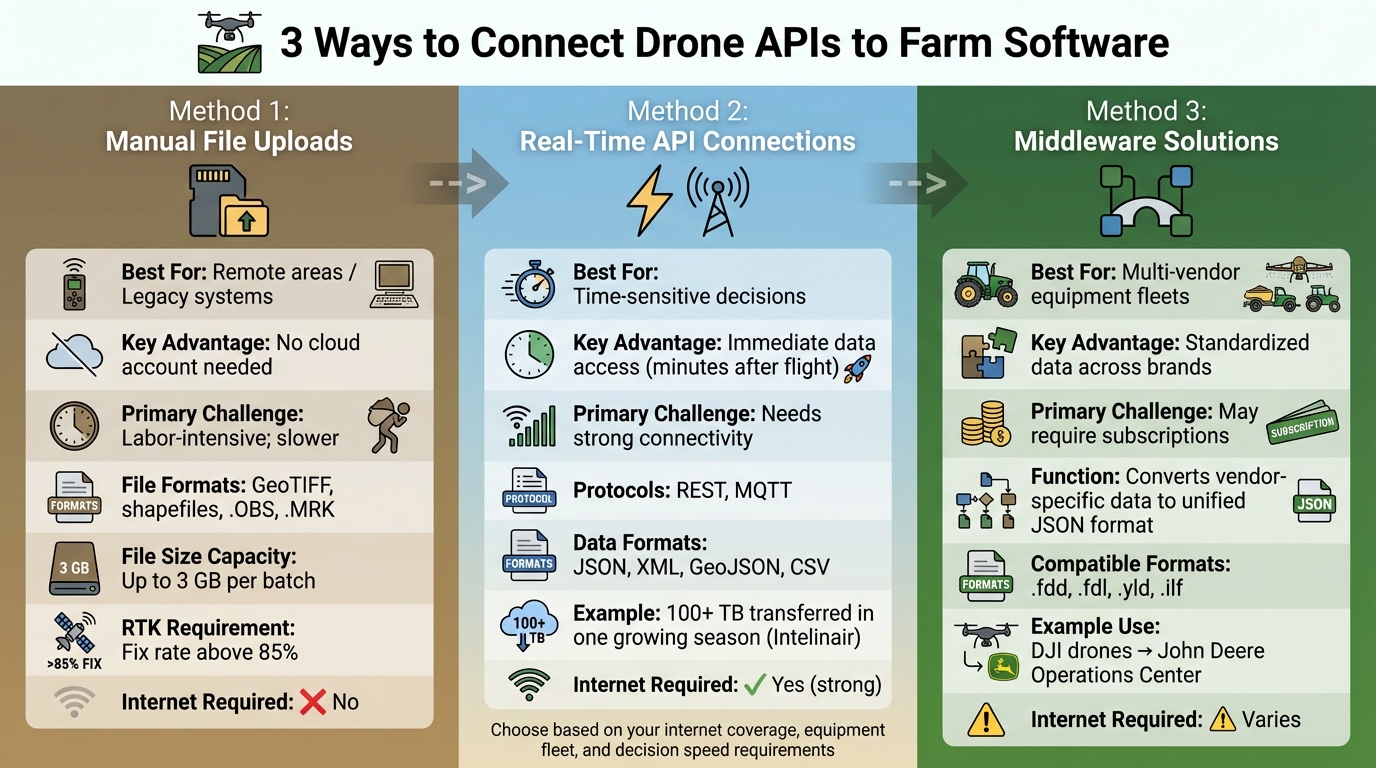
Once you have a handle on how APIs work, the next step is figuring out the best way to connect them to your farm software. There are three main options: manual uploads, real-time API connections, and middleware solutions. The right choice depends on factors like your internet access, the type of equipment you use, and how quickly you need the data. Let’s break each method down and see where it fits best.
Manual File Uploads
With manual uploads, you transfer data files directly from your drone’s SD card or storage device to your farm management software. These files often come in formats like GeoTIFF, shapefiles, or specific logs (.OBS, .MRK) [12]. This approach works especially well in areas with unreliable internet or for those who prefer desktop software like DJI Terra.
The big plus here? You don’t need a cloud account or constant internet access. You can process the data on your laptop right in the field, often within minutes of the drone landing. Many manual upload systems now handle file sizes up to 3 GB per batch [10]. While it’s not automated, it’s a practical option for areas with limited connectivity.
Pro Tip: Make sure your dataset includes RTK (Real-Time Kinematics) data for accurate geospatial mapping. Aim for an RTK fix rate above 85% during flights to ensure your maps align with your equipment’s guidance systems [12]. For desktop users, setting up “Watch Folders” can be a game-changer - they automatically upload data to the cloud as soon as you plug in the SD card [13].
Real-Time API Connections
Real-time API connections automate the data flow between your drone and farm management software. This is perfect for large-scale farms where quick decisions - like adjusting irrigation or tackling pests - are critical. With this setup, georeferenced imagery arrives in your system just minutes after the drone finishes its flight.
For example, in January 2026, Intelinair used MASV’s managed file transfer system to move over 100 TB of imagery during the U.S. growing season. Sriram Rapaka, their VP of Operations, shared:
"MASV solved our problems effortlessly... It has been so easy to use – so impressive in terms of how well the product works" [13].
However, this method does require reliable internet. If your farm is in a rural area with weak connectivity, consider using channel bonding middleware. This combines multiple internet sources, like Starlink and 5G, to minimize upload failures [13].
Middleware Solutions for Advanced Integration
Middleware acts as a bridge when you’re working with multiple hardware brands. For instance, it can take data from DJI drones and feed it into systems like John Deere Operations Center or Climate FieldView. Instead of juggling separate integrations for each piece of equipment, middleware uses a unified API to convert vendor-specific data into a standardized JSON format [11].
This is especially useful if your operation relies on a mix of equipment from different manufacturers. For example, you might have John Deere tractors, Trimble guidance systems, and AgLeader monitors, all producing data in various formats (.fdd, .fdl, .yld, .ilf) [10]. Middleware simplifies this by standardizing everything, making it easier for your farm management software to process.
Here’s a quick comparison of the three methods:
| Integration Method | Best For | Key Advantage | Primary Challenge |
|---|---|---|---|
| Manual Upload | Remote areas / Legacy systems | No cloud account needed | Labor-intensive; slower |
| Real-Time API | Time-sensitive decisions | Immediate data access | Needs strong connectivity |
| Middleware | Multi-vendor equipment fleets | Standardized data | May require subscriptions |
Before you choose a method, evaluate your internet coverage, check that your drone software supports standard file formats, and confirm compatibility with your farm management system [14].
How to Set Up Drone API Connections: Step-by-Step
Setting up drone API connections involves three main steps: checking compatibility between systems, configuring API endpoints and security, and testing your connection.
Check Compatibility Between Systems
First, ensure that your drone, software, and farm platform are compatible. Confirm that your farm software supports common geospatial formats like KML, KMZ, Shapefiles, GeoJSON, or CSV for handling field boundaries and mission data [6][2].
Next, decide how data will transfer. Will your farm software "pull" data from the drone platform using a REST API, or will the drone system "push" data automatically via Webhooks or Socket.io? For live tracking during spray operations, Socket.io is ideal for real-time updates rather than relying on historical data retrieval [2][15].
It’s also critical to match your drone hardware with compatible mission planning software. For example, if you’re using DJI Agras drones, ensure they work with tools like DJI Terra, DroneDeploy, or Pix4Dfields before connecting them to your farm management system [6]. The same applies to other platforms like the Talos T60X or XAG drones.
Here’s a quick guide to the main compatibility factors:
| Compatibility Factor | Common Standards/Options | Purpose |
|---|---|---|
| Data Formats | KML, KMZ, Shapefile, GeoJSON, CSV, GPX | Field boundaries and telemetry [6][2] |
| API Protocols | REST, Socket.io, Webhooks | Data retrieval and real-time updates [2][15] |
| Authentication | OAuth 2.0, API Keys, Personal Access Tokens | Secure system access [2][15] |
| Imagery Types | RGB, Multispectral, Thermal, NDVI | Crop health and mapping [1] |
| Positioning | RTK, GNSS (GPS, GLONASS, Galileo) | Centimeter-level accuracy [16] |
If you’re managing a mixed fleet with drones from different manufacturers, make sure nozzle settings and droplet sizes are consistent across platforms for uniform application data [6]. Once compatibility is verified, you can move on to setting up secure and functional API endpoints.
Configure API Endpoints and Security
Start by defining the specific URL (endpoint) for sending or retrieving data, along with the REST method - typically GET for retrieving data or POST for sending it [17].
Choose an authentication method that fits your security needs. API Keys are suitable for simple, read-only access, but for stronger protection, opt for OAuth 2.0 or JWT Bearer tokens. For added security, OAuth 2.0 with PKCE (Proof Key for Code Exchange) helps prevent attacks like Cross-Site Request Forgery [18]. If you only need straightforward access to telemetry or device data, consider generating Personal Access Tokens within the drone platform’s app [19].
When setting up your request headers, include key/value pairs and specify the Content-Type - typically application/json for raw data or application/x-www-form-urlencoded for form data [17]. For added protection, methods like Hawk Authentication use HMAC digests to detect tampering during data transmission [18].
Here’s an example: Leaf Agriculture’s integration with Sentera’s FieldAgent in February 2022 followed a secure four-step process. It involved creating a "Leaf User", attaching Sentera credentials via POST request, and using GET requests to retrieve field boundaries and NDVI/RGB imagery layers [7].
To simplify setup, use the "Import cURL" feature in connector tools. This automatically fills in authorization, request methods, headers, and parameters, reducing manual errors [17]. When querying telemetry, specify details like a time range (from and to) and a geographical region (bbox) for precise and secure data retrieval [19]. Note that bbox parameters are limited to moderately sized regions [19].
Once endpoints and security are configured, it’s time to test the connection.
Test Your API Connection
Start by ensuring that authentication credentials are set up correctly. Verify that Personal Access Tokens or OpenID Connect (OIDC) protocols allow your app to access private data or account assets [19][2].
Use simulated data provided by the API developer to test your connection and workflows before running live flight tests [19]. Confirm that your system can handle specific data schemas, such as the Dronetag Unified Message Protocol (DUMP), and standard formats like JSON, CSV, KML, GPX, or GeoJSON [19][2]. Before automating processes, manually test a data export from your drone software to ensure it imports correctly into your farm platform [2].
Test both real-time and historical data flows. REST API endpoints are useful for retrieving historical telemetry, while Socket.io endpoints enable real-time data streaming [19][2]. If requesting data in formats like KML or GeoJSON, set the correct MIME type in the Accept header [2].
Ensure georeferenced imagery integrates seamlessly. Whether you’re working with RGB, multispectral, or thermal imagery, it should feed directly into your farm management software without extra processing [1]. If using third-party tools like QGIS, DroneDeploy, or Pix4Dfields, test exporting and importing field boundaries in compatible formats to avoid mission overlaps [6].
"Our partners don't want to spend time wrangling drone data. They want clean, consistent imagery they can feed into their platform and start working with" [1].
For specialized equipment like the DJI Agras T10, confirm that your software can process data from advanced sensors, such as arms-in-place detection and obstacle avoidance radar [16]. Always run a complete test mission - from takeoff to data delivery - before relying on the system for real-world farm operations.
Using Integrated Drone Data for Farm Management
With solid API connections in place, drone data can directly influence smarter on-field decisions. From managing inputs to monitoring crop health and automating operations, this tech-driven approach brings a new level of precision to farm management.
Generate Variable Rate Application Maps
APIs enable drones to create prescription maps that guide equipment on where and how much to apply fertilizers, pesticides, or water. Start by importing field boundaries as SHP files and uploading RGB or multispectral orthophotos. Use indices like VARI or NDVI to analyze field variability [3][21]. For more advanced needs, AI-powered weed detection can handle complex fields.
Once the data is processed, you can define application zones using grid templates or custom parameters. For example, if you're using XAG drones, set tile sizes to 5x5 meters with a maximum of three zones for compatibility [20]. If your field exceeds 33 hectares, software like Agremo can automatically split it into manageable sections [20].
The final prescription map can be exported in formats like SHP, RX, KML, or JSON, ready for integration with platforms like John Deere Operations Center or spraying drones such as the DJI Agras series [3][21][1]. For instance, Bowles Farming Company in California used DroneDeploy and John Deere Operations Center in September 2021 to map 3,200 acres of cotton with a DJI Inspire 1 Pro. Technology specialist Justin Metz created a variable rate map using the VARI index to target areas needing less defoliant spray. By importing the data into the John Deere Operations Center, they saved $11–15 per acre on areas that didn’t require a second spray [21].
"Defoliant spraying is another $11–15 per acre, so for every acre we don't have to spray, we increase our net profit for the harvest." - Justin Metz, Technology Integration Specialist, Bowles Farming Company [21]
Monitor Crops in Real-Time and Track Seasonal Trends
Integrated systems make it possible to track crop health in real-time and analyze performance trends over multiple seasons. For basic checks, RGB cameras paired with the VARI algorithm can detect stress during a single flight. For more detailed, long-term health data, multispectral or NIR sensors combined with the NDVI algorithm are ideal [22]. If you're just starting out, RGB cameras are a cost-effective way to get familiar with drone monitoring before investing in pricier multispectral options [22].
Once the API processes your imagery, vegetation indices transform light reflection data into color-coded maps highlighting crop stress and variability [22]. For more in-depth analysis, trigger AI tools through the API for tasks like assessing plant vigor, counting stands, or detecting weeds [3][7]. However, always ground-truth your findings by inspecting areas flagged as stressed to identify the root cause, whether it’s pests, water issues, or nutrient deficiencies [22].
"It is extremely important to put your boots on the ground - every NDVI map should still be ground-truthed." - Norm Lamothe, Deveron UAS Corp [22]
Keep in mind that RGB sensors require consistent sunlight and cloud cover during flights for accurate data, as they can't be calibrated for absolute readings over time. Multispectral cameras, which can be calibrated using incident light sensors, are better suited for tracking seasonal trends and generating detailed agronomist reports [22].
Automate Farm Operations
Drone data doesn’t just monitor - it can also drive automation. For example, drones equipped with thermal sensors can detect water stress or irrigation leaks, enabling farm software to optimize irrigation schedules and conserve water [23][25]. This is especially important as water scarcity is predicted to affect up to 84% of global cultivated areas by the end of the century [23].
For precision spraying, drones can cut chemical use by up to 45% compared to traditional methods [23]. Advanced models like the DJI Agras T40 can cover up to 10 hectares per hour, using variable-flow nozzles for applications as precise as 1 mL/m² [23]. Integrated weather data further refines spraying patterns, reducing waste and improving accuracy [24].
AI-powered analyses can also generate automatic alerts for pest infestations or disease patterns that might otherwise go unnoticed, allowing for quicker responses [24][26]. Start small by automating one task, like pest scouting or fence inspections, before scaling up to more complex operations like variable rate spraying [25]. Ensure that drone data integrates seamlessly with your farm software, GPS-enabled tractors, and chemical application records to streamline workflows [25]. Focus on key indicators such as plant health (NDVI/NDRE), soil variation, or water pooling to avoid overwhelming yourself with data [25].
"Drones are projected to provide a $32.4 billion economic value to the farmers." - PwC Report [5]
Conclusion
Integrating drone APIs is changing the game for U.S. farm operations by replacing outdated, disconnected tools and manual processes with automated workflows. These systems help lower input costs and provide real-time insights that farmers can act on. Whether it's creating variable rate application maps or managing mixed fleets to double coverage per hour, the results are tangible and impactful.
One of the standout advantages of these integrations is the flexibility they offer. Software-driven ecosystems eliminate the constraints of being tied to a single manufacturer. For example, mixed fleets like the Talos T60X and DJI Agras T50 can operate seamlessly under a unified API system [6]. This freedom allows farmers to scale their operations by choosing the right equipment for specific tasks without overhauling their entire setup.
"At Drone Spray Pro, we don't just sell drones - we help you set up workflows so you can hit the ground running." - Drone Spray Pro [6]
Drone Spray Pro goes beyond simply providing hardware. They offer comprehensive support, including technical assistance, FAA licensing guidance, and training on mission planning software. Whether you're starting with a single DJI Agras T40 or building a diverse fleet, their team ensures a smooth transition to integrated workflows. With real-world farming expertise, they help you configure API connections and select compatible equipment for your needs.
This approach highlights a key takeaway: effective API integration is at the heart of modern, efficient farm management. By leveraging proven technology and streamlined workflows, farmers can achieve clear financial benefits. Start small with an ABZ L30 agricultural drone package for prescription mapping, crop monitoring, or precision spraying, and expand as the results come in. With API-driven systems, data becomes a powerful tool for making decisions that improve yields, lower costs, and drive operational efficiency.
FAQs
Which drone data types should I sync into my farm software first?
To get the most out of your farm software, focus on aligning spray coverage, droplet distribution, and factors like weather conditions to improve spray operations and promote healthier crops. Incorporate crop health insights from multispectral sensors and use field boundary details through KML files for precise mapping and mission planning. By prioritizing these data points, you can streamline decision-making and boost the overall efficiency of your farm management system.
Do I need reliable internet to use drone APIs on my farm?
Absolutely, having a steady internet connection is crucial when working with drone APIs on your farm. Integration methods such as HTTP API or Websockets rely on stable connectivity to access both real-time and historical data effectively. Plus, features like real-time data sharing and control through push modes - such as webhooks or MQTT - depend on uninterrupted internet to maintain smooth communication and functionality. Without it, these systems won’t perform as intended.
How do I keep drone-to-software API connections secure?
To keep drone-to-software API connections safe, start by using strong authentication methods like API Keys or Basic Authentication to ensure only authorized users can access the system. Pair this with secure communication protocols, such as encrypted API calls, to safeguard sensitive information during transmission.
It's also crucial to regularly update both the drone's firmware and associated applications. These updates often address security gaps and improve features, such as geofencing, which can add an extra layer of protection. By combining these strategies, you can help ensure your API connections remain secure and dependable.