Call or Text: +1 (208) 425-2990
Email: Sales@DroneSprayPro.com

5 GPS Troubleshooting Tips for DJI Agras Drones
If your DJI Agras drone is losing GPS signal or struggling with positioning, it can disrupt spraying accuracy, cause safety risks, and even disable features like Return to Home. Here's how to fix it:
- Fix GNSS Positioning Offset: Use RTK hardware like D-RTK 2 or D-RTK 3 for precise positioning. Ensure open spaces with no obstructions and connect to at least 12 satellites before takeoff.
- Calibrate IMU and Compass: Align the drone's sensors to ensure stable flight and accurate orientation. Perform calibration in open areas, away from metal objects and power lines.
- Update Firmware and Software: Regular updates improve GPS performance and fix bugs. Use the DJI Agras app to check for updates before flying.
- Check GNSS Antennas and Compass: Inspect hardware for damage or loose connections. Replace antennas every 700 flight hours for consistent GPS performance.
- Perform Ground Proofing and Offset Correction: Calibrate the drone in flat, open areas to sync GPS and IMU data for accurate spraying routes.
Key Tip: Always launch in open spaces, away from interference, and ensure a strong GPS lock (12 satellites, 3 bars) before starting any mission.
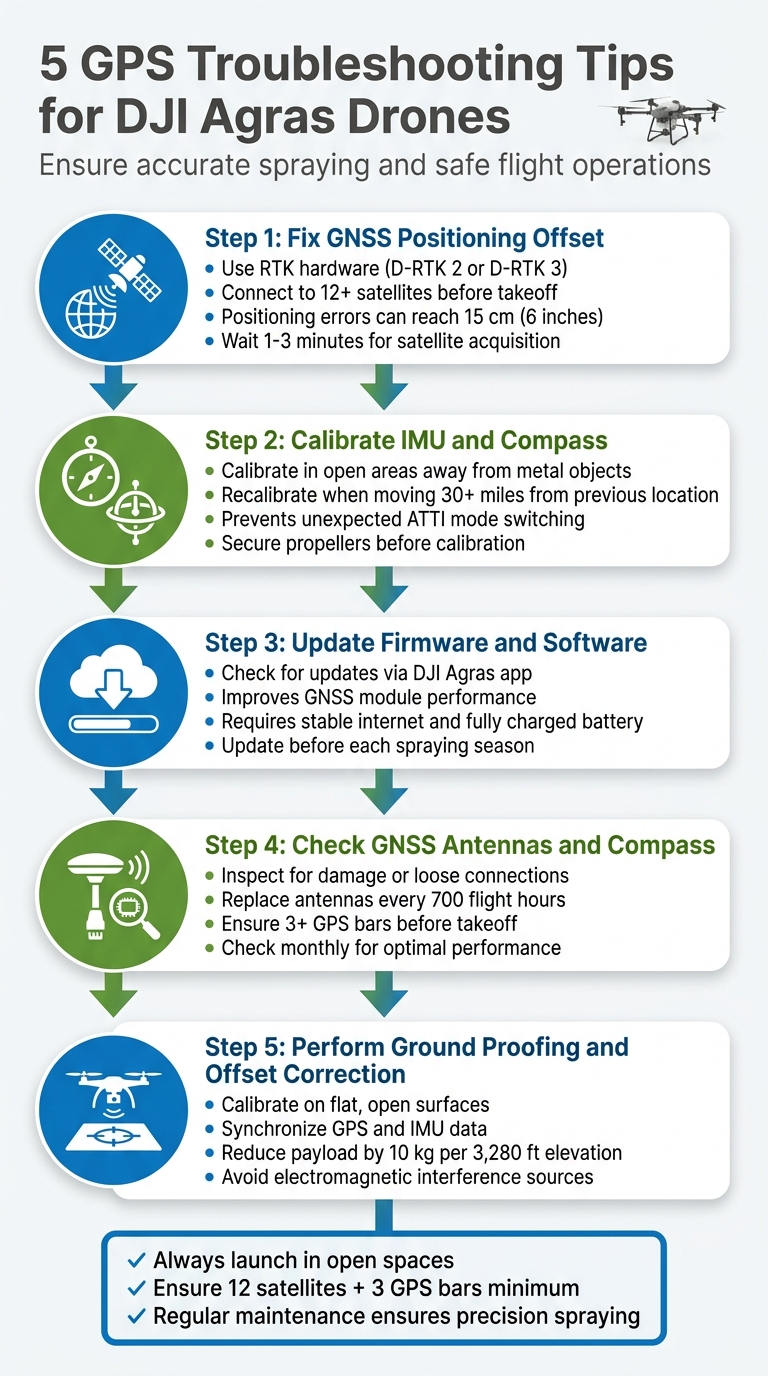
5 GPS Troubleshooting Steps for DJI Agras Drones
DJI Agras | How to Rectify Offset (Ground Proofing Explained Step-by-Step)
sbb-itb-3b7eef7
1. Fix GNSS Positioning Offset
GNSS positioning offset happens when a drone's reported location doesn't match its actual position, which can throw off precise spray coverage.
Impact on GPS Accuracy
Positioning errors can be as much as 15 cm (around 6 inches). That might not seem like much, but for accurate spraying, it’s a big deal [3]. High temperatures - above 104°F (40°C) - make things worse. The heat causes antenna components to expand, leading to receiver drift and more errors [3]. If it gets bad enough, the drone might switch to ATTI (Attitude) mode, losing its automated position hold. This forces you into manual control, which is riskier [1].
Required Tools or Conditions
Fixing these offsets starts with the right equipment. RTK hardware, such as the D-RTK 2 or D-RTK 3 mobile stations, provides centimeter-level accuracy to eliminate common GNSS errors [4]. But it’s not just about the tools - you also need the right environment. Open spaces are key because buildings, trees, and metal structures can block satellite signals [1]. Additionally, your drone should connect to at least 12 satellites with three GPS bars visible before takeoff [1].
"When the GPS icon in your controller app shows fewer than three bars... losing GPS will cause the aircraft to hover and, if combined with RC signal loss, trigger a land-in-place failsafe instead of Return-to-Home." - Dronescend Support [1]
These conditions set the stage for proper calibration, which is crucial for achieving accurate positioning.
Ease of Calibration Process
Calibrating your drone isn’t complicated, but it does take some patience. After powering it on, allow 1–3 minutes for full satellite acquisition [1]. In hotter conditions, you might need to wait up to 8 minutes to stabilize the RTK fix rates [3]. Always calibrate on a level surface and steer clear of power lines or large metal objects, as they can cause electromagnetic interference [1]. For monitoring and troubleshooting, DJI Terra software is an excellent tool. It helps track positioning accuracy and refine flight route planning [4]. Taking the time to calibrate properly ensures your drone follows its spray routes with precision.
2. Calibrate IMU and Compass
Getting the IMU (Inertial Measurement Unit) and compass properly calibrated is crucial for reliable GPS positioning and steady flight performance. These two systems work together to maintain your drone's stability and orientation. If the compass is out of alignment, the drone’s heading won’t match its GPS data, leading to confusion for the flight controller about the drone’s actual direction. Similarly, an improperly calibrated IMU can result in barometer drift and instability. Without accurate calibration, your Agras drone risks switching to Attitude mode unexpectedly, where GPS and automated features become unreliable.
Impact on GPS Accuracy
A calibrated compass ensures your drone’s heading aligns with its GPS data, enabling it to correctly determine its orientation relative to the Earth. The IMU, on the other hand, fine-tunes sensors responsible for measuring balance, acceleration, and altitude. If either system is off, you might notice drifting or other stability issues, even if the GPS lock seems strong. Repeated calibration failures in ideal conditions can signal a hardware issue with the aerial electronics module or RTK components, rather than just a software glitch. To avoid these problems, follow calibration steps carefully.
Required Tools and Conditions
To start, access the calibration menu through the DJI Agras app. Perform the calibration outdoors in an open area, steering clear of large metal objects, reinforced concrete structures, vehicles, or power lines, as these can interfere with magnetic readings. For IMU calibration, place the drone on a flat and level surface to ensure accurate sensor adjustment. Avoid indoor calibration, as enclosed spaces can produce inaccurate results.
Ease of the Calibration Process
While the calibration process is simple, it demands precision. Secure the propellers before starting. For compass calibration, keep the drone level and rotate it fully along both horizontal and vertical axes until the indicator turns green. For IMU calibration, leave the drone stationary on a level surface while the sensors adjust. It’s a good idea to recalibrate the compass whenever you operate in a new location more than 30 miles from your previous flight or when prompted by the app.
Applicability to DJI Agras Models
These calibration steps apply to all DJI Agras models. Before starting, double-check that all drone arms are securely locked in place. Loose arms can throw off calibration accuracy and even affect spraying patterns during operation.
3. Update Firmware and Software
Keeping your firmware and software up to date is a practical way to address GPS issues. DJI regularly releases updates that resolve bugs affecting satellite positioning, improve GNSS module performance, and boost overall flight stability. Running outdated firmware can lead to problems like GPS drift, weak satellite locks, or reduced RTK accuracy during spraying operations.
Impact on GPS Accuracy
Firmware updates often include fixes aimed at improving GPS performance. These updates can resolve bugs that interfere with satellite connections and enhance the GNSS module's efficiency. If your drone's software is outdated, you might notice difficulties maintaining a strong satellite connection or errors in positioning that disrupt automated flight paths and spray coverage. By updating your firmware, you directly improve GPS accuracy and ensure more reliable flight performance.
Required Tools or Conditions
Before starting a firmware update, make sure you have the right tools and conditions in place. Here's what you'll need:
- A stable internet connection
- A fully charged battery
- The latest version of the DJI Agras app installed on your remote controller or mobile device
You can download firmware updates through the app while connected to your drone. Since firmware files can be quite large, it’s best to be in an area with strong Wi-Fi or cellular coverage. Once the update begins, avoid interrupting the process, as this could corrupt the firmware and lead to even bigger issues.
Applicability to DJI Agras Models
Firmware updates are beneficial for all DJI Agras models, including the T10, T30, T40, and T50. Each update is tailored to the specific hardware of the model. It’s a good practice to check for updates before the start of each spraying season and whenever you encounter GPS-related problems. While the update process is consistent across models, newer drones like the DJI Agras T50 may receive updates more frequently as DJI continues refining their latest technology.
4. Check GNSS Antennas and Compass
While keeping your software up to date and calibrating regularly is important, the condition of your hardware is just as critical. Issues like physical damage or loose connections in the GNSS antennas or compass can lead to GPS errors. If these components aren't functioning properly, your DJI Agras drone might unexpectedly switch to ATTI (Attitude) mode, which can compromise stability during spraying operations. A clear sign of trouble is when the GPS icon shows fewer than three bars[1]. Regular inspections are key to maintaining reliable calibration and ensuring consistent GPS performance.
Impact on GPS Accuracy
When there's misalignment between the compass and GPS data, it can disrupt the satellite fix and affect flight stability. This misalignment can make automated missions and waypoint flights unreliable. It might also interfere with failsafe functions - for instance, instead of safely returning to home, the drone might initiate a "land-in-place" command if the remote signal is lost. For dependable position holding, your Agras drone needs a lock on at least 12 satellites and a minimum of three GPS bars before taking off[1].
Required Tools or Conditions
Maintaining your GNSS system doesn't require specialized tools. You can secure loose antenna connections with pliers and clear dust with compressed air. Before calibrating the compass, make sure the propellers are secured to avoid interference. Use your DJI remote controller to check GPS signal strength and RTK status during preflight checks. Always perform these checks in a flat, debris-free area to ensure proper signal reception. Regular hardware inspections, paired with calibration, help maintain precise GPS functionality.
Applicability to DJI Agras Models
This maintenance step is relevant to all DJI Agras models. With the power off, periodically remove the top cover to check for loose or damaged GNSS/RTK connections[1]. Ensure RTK antennas are securely mounted in the rear covers to avoid sudden GPS issues. Examine the drone's top and rear covers for cracks or warping, as these could allow water to seep into the cable distribution board or lead to barometer errors. Inspect GNSS antennas monthly and replace them every 700 flight hours to minimize the risk of hardware-related signal failures.
5. Perform Ground Proofing and Offset Correction
Ground proofing ensures your DJI Agras drone's positioning system accurately reflects its actual location. Without proper calibration, mismatches between the compass and GPS data can arise. This can disrupt critical functions like position hold, waypoint navigation, and the reliability of Return-to-Home operations [1].
Impact on GPS Accuracy
Proper ground proofing minimizes positioning errors, which is crucial for accurate spraying patterns and seamless automated missions. Recalibration ensures that IMU sensors and GPS data are synchronized for precise positioning. For high-altitude operations, reduce payload by 10 kg for every 3,280 feet of elevation gain to maintain stability [5]. Additionally, ensure your system locks onto at least 12 satellites before starting any mission-critical tasks [1]. Performing ground proofing under optimal conditions is also essential for success.
Required Tools or Conditions
You don’t need any special tools - just the right conditions. Select an open area free from obstructions and electromagnetic interference. Place the drone on a flat surface for IMU calibration, and after powering it on, allow 1–3 minutes for the GPS module to acquire satellites and update its almanac. Confirm a strong GPS lock on your controller before proceeding [1].
Applicability to DJI Agras Models
This ground proofing process applies to all DJI Agras models and is particularly important if you notice positioning drift or after moving your drone to a new location. Calibrating the airframe accurately ensures steady application rates, even across different field conditions [5]. To maintain accuracy, avoid calibrating near sources of magnetic interference like metal scaffolding or power lines. Regular ground proofing, along with firmware updates and hardware checks, keeps your GPS system dependable.
Conclusion
Reliable GPS performance is crucial for safe and accurate agricultural spraying. A steady GPS fix, ideally with 12 satellites and three signal bars, ensures precision in your operations. As DJI Agriculture puts it:
Maintaining your DJI Agras T40 is more than the sum of checking items off a list. It's a discipline that ensures the longevity and efficiency of your investment[2].
Addressing GPS issues before takeoff minimizes downtime and keeps your spraying schedule on track.
Environmental conditions can greatly influence GPS accuracy. Always launch your drone in open spaces, away from high-voltage power lines, metal structures, or dense foliage. If you've relocated, give the GPS system time to recalibrate before starting your mission.
In addition to technique, the quality of your equipment and support can make a big difference. For operators looking for dependable hardware and expert assistance, Drone Spray Pro provides DJI Agras drones, RTK dongles, and the expertise needed for smooth spray operations. Whether you're calibrating sensors, updating firmware, or resolving error codes, having the right tools and knowledgeable support ensures your drone remains a reliable asset for efficient crop spraying. By following these troubleshooting tips, you can maintain efficiency and safeguard your investment.
FAQs
Why does my Agras drone switch to ATTI mode during a mission?
When your DJI Agras drone switches to ATTI mode, it's often due to problems with GPS signal stability or a loss of RTK correction - both essential for accurate positioning. This can happen because of weak satellite signals, physical obstacles blocking the signal, or problems with the hardware setup.
To avoid this, make sure the drone has a clear view of the sky, double-check all hardware connections, and keep the firmware up to date. Additionally, issues with the RTK module or RF connection during a mission can also cause the drone to enter ATTI mode. Regular maintenance and checks can help minimize these disruptions.
When should I use RTK instead of standard GPS on an Agras drone?
For tasks that demand centimeter-level accuracy, consider using RTK instead of standard GPS on an Agras drone. This level of precision is crucial for reducing overlap and cutting down on chemical waste, especially in large or sensitive fields. RTK provides the exact positioning needed for highly precise applications.
What should I check if GPS bars stay low even in an open field?
If your GPS signal remains weak even in an open field, consider potential interference sources. Power lines or large metal structures nearby can disrupt the signal. Also, make sure your drone’s firmware and GPS module are fully updated. Take a moment to inspect the GPS antenna for any visible damage or loose connections. For better signal strength, try flying in areas with a clear view of the sky and minimal interference.