Call or Text: +1 (208) 425-2990
Email: Sales@DroneSprayPro.com

ESC Fault Code List for Spray Drones
Most ESC faults are not a bad ESC. In many cases, the cause is a loose connector, a CAN/8-pin cable issue, low voltage at startup, heat, or a firmware mismatch. That matters because swapping parts too soon can waste time and money.
If I had to boil this article down into one field checklist, it would be this:
- Power cycle first: remove the battery for 10 seconds
- Check wiring next: 8-pin cable, CAN link, rear boom harness, nozzle and pump connectors
- Look at version data: 0.0.0 often points to a communication or module problem
-
Watch for code patterns:
- 32-xxx = power assembly or communication path issue
- 27-013 = rear disc ESC disconnected
- 27-025 = rear gear ESC abnormality
- 23-011 = gear busbar overcurrent
- Do swap testing before replacement: unplug nozzles, try one known-good nozzle, then see whether the fault moves
- Check battery and heat: voltage sag, swelling, and high temps can trigger shutdowns
A few plain-English rules help too:
- If the drone won’t arm at startup, think auto-check, wiring, firmware, or offline ESC
- If a motor twitches but won’t spin, think connection, timing, motor, or low-thrust fault
- If spraying stops on one side, think disc ESC, nozzle ESC, harness, or tank-side link issue
- If the app shows 0.0.0, the system often can’t talk to that part
- If the fault clears after unplugging one device on a shared link, that device may be taking the whole link down
Here’s the short version by fault type:
| Fault area | What it usually means | First thing I’d check |
|---|---|---|
| ESC auto-check failed | Startup communication problem | Power cycle, then inspect 8-pin/CAN wiring |
| Pump or disc ESC disconnected | Spray-side ESC not talking | Reseat harness and check module version |
| Rear gear ESC abnormality | Rear link device or harness fault | Isolate the rear link and unplug nozzles |
| ESC offline / firmware missing | ESC seen but not responding right | Retry update, then inspect power and signal |
| Overcurrent / overvoltage / overtemp | ESC protection shutdown | Battery, load, airflow, and heat |
| Low thrust / not enough force | Motor system can’t make enough lift | Prop, battery, motor response, and connectors |
One more point: the article covers DJI Agras, EAV J100, and XAG-style fault behavior. DJI often shows text alerts like “ESC Status Error.” EAV J100 often shows number codes like 27-025 or 32-016. That difference changes the first step: read the fault type right, then test the link before replacing hardware.
If you want the full list in plain language, the article below walks through each code group, what it means, and the first checks that make sense in the field.
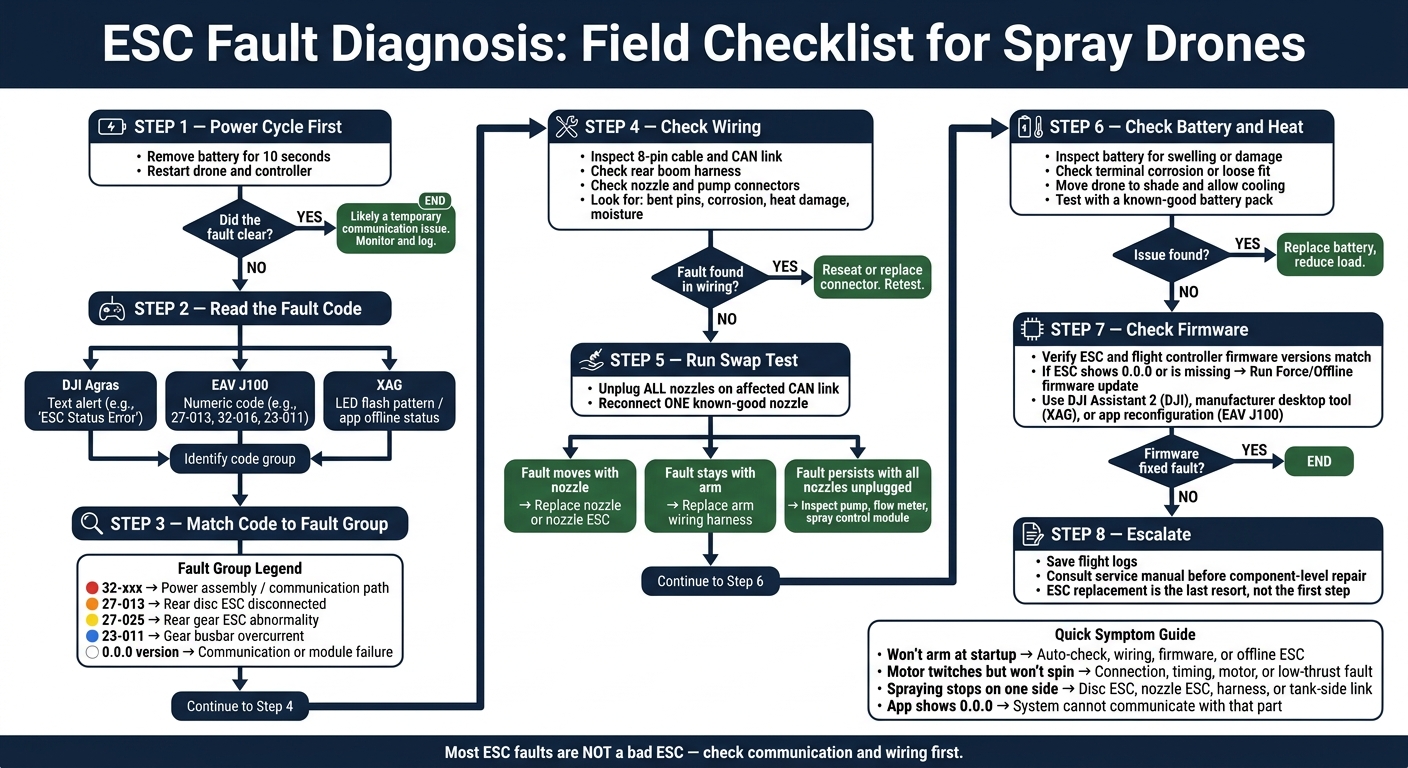
ESC Fault Diagnosis Flowchart for Spray Drones
How ESC Faults Show Up on Spray Drones
ESC faults don't look the same on every spray drone. Each brand has its own way of flagging the problem, so the first clue is often how the fault appears.
DJI Agras usually shows plain text alerts, such as "ESC Status Error" or "ESC Connection Error."
EAV J100 uses number-based fault codes that point to both the ESC involved and the kind of issue. For example, 27-013 means a rear disc ESC is disconnected, while 27-025 means a rear gear ESC abnormality.[1]
XAG usually shows ESC trouble through app offline status and LED flash patterns on the hardware.
That difference matters. If one brand gives you text and another gives you code numbers or light signals, the first step isn't repair - it's reading the signal the right way.
These display patterns help narrow the fault before moving into the code list below. The next section translates each fault code into a plain-language cause and first check.
sbb-itb-3b7eef7
1. ESC Auto Check Error
Plain-Language Meaning
An ESC Auto Check Error means the flight controller failed its startup check because one or more ESCs didn’t respond the way they should. This usually shows up during startup, and it keeps the drone from arming.
Put simply: the flight controller could not finish its ESC startup check. Since this is a startup fault, start with wiring and firmware before you swap any parts.
Likely Causes
The most common cause is a loose or damaged connection. In many cases, the problem is the 8-pin cable or harness between the ESC and the flight controller.
A firmware mismatch can also cause this error. If the flight controller and ESC aren’t on supported matching versions, communication can fail at startup.
In some cases, the ESC itself may have failed due to electrical stress or heat.
First Diagnostic Steps
Start with the fastest checks first.
Power cycle the system: turn off the drone and transmitter, remove the battery for at least 10 seconds, and then start everything again.
If the error comes back, inspect the 8-pin cable or harness for loose pins, bent connectors, or any visible damage. After that, check the system status page for an ESC showing a version number of 0.0.0. That usually points to a failed startup check.
If the firmware versions don’t match, update the flight controller and ESCs on platforms like the DJI Agras T40 so they’re on the same supported version.
Platform Examples
On EAV J100 units, this fault may also appear as a version or communication code.
| Platform | Error Display | What It Signals |
|---|---|---|
| EAV J100 | 32-004 / 32-008 / 32-012 / 32-016 | Power assembly communication disconnected (front/rear, left/right) |
On the EAV J100, ESCs share communication lines. That means one failed device on the line can interfere with other ESCs connected to that same line. [1]
2. Centrifugal Motor ESC Error (Disconnected or Low Voltage)
Plain-Language Meaning
This error means the flight controller can’t communicate with the ESC that runs the centrifugal spray disc motor, or that motor isn’t getting steady power. When it shows up, the drone will often disarm or refuse to start the motors. The next place to look is the connector and the power feed.
Likely Causes
On spray drones, vibration is often the culprit. Heavy liquid loads and high-torque motors can slowly shake connectors loose over time. This is a common maintenance check for high-capacity systems like the ABZ L30 Agricultural Drone. [1]
Loose connectors or weak solder joints often cause intermittent ESC faults on spray drones.
A low-voltage reading usually points to voltage sag during startup or a loose power connection. [1]
First Diagnostic Steps
Start by inspecting the centrifugal motor ESC connector and harness. Look for loose pins, corrosion, or signs of heat damage. If the connector feels secure, check battery voltage during startup. A sharp drop usually points to voltage sag or a bad power connection. [1]
3. Pump ESC Auto Check Failed
Plain-Language Meaning
This fault follows the same startup check pattern as the previous ESC error, but here the problem is in the pump circuit. The flight controller did not receive a valid startup response from the pump ESC. Until that clears, the drone will not arm or start a mission.
Likely Causes
Common causes include:
- A loose 8-pin cable or CAN cable
- A firmware mismatch between the flight controller and pump ESC
- Pump ESC stress caused by electrical surges, heat, or moisture [1]
First Diagnostic Steps
Start with the harness first. Then make sure the pump ESC is powered and communicating the way it should.
Power cycle the drone, transmitter, and battery for at least 10 seconds. If the fault comes back, inspect the wiring harness for bent pins, loose connectors, heat damage, or moisture damage. Then check the app's Device/Module page. If the pump ESC shows 0.0.0 or does not appear at all, the pump ESC or harness is likely at fault [1].
Platform Examples
| Platform | How the Fault Appears | Key Diagnostic Step |
|---|---|---|
| DJI Agras | "ESC Status Error" or "ESC Connection Error" | Check firmware via DJI Assistant 2; inspect the 8-pin main cable |
| EAV J100 | "Power Assembly Disconnected" or 0.0.0 version number | Unplug nozzles on the affected CAN link to isolate the pump ESC |
| General Spray Drones | Pump motor twitches without spinning; "Auto-check failed" notification | Calibrate the ESC through the flight controller software |
On the EAV J100, a fault on any device sharing the same CAN link, including nozzles or flow meters, can interfere with the pump ESC signal and trigger this error.
4. Motor Backup Throttle Loss / Not Enough Force ESC Error
Plain-Language Meaning
This fault is different from the spray-pump issues above because it affects flight thrust. In plain English, one or more motors aren't producing enough force to keep the aircraft stable in the air. When that happens, the drone may refuse to arm.
Likely Causes
- Damaged or badly installed propeller
- Low or unstable battery voltage
- Loose connectors or weak solder joints that interrupt motor output
- A flight controller-ESC protocol mismatch
First Diagnostic Steps
Start with a full power cycle, then check whether the fault comes back. If it does, look at the propellers first. Check installation, direction, and any signs of damage. A bad prop can sometimes trigger a low-thrust warning even when the motor itself is fine.
Next, inspect the 8-pin cables. Look for bent pins, worn spots, or other damage, and press each connector in firmly. Small connection issues can cause big headaches here.
Open the Device/Module page in the drone app. If one arm shows no motor ESC response, that usually points to a broken communication link or a hardware failure on that unit [1]. If a motor twitches but won't spin, that's often tied to a timing mismatch in the motor setup or a weak connection. For faults that stick around, run ESC calibration in the flight controller software and make sure firmware and protocol settings line up across the whole system.
If the warning is still there after those checks, the fault usually comes down to the motor, the ESC, or the power feed.
Platform Examples
| Platform | How the Fault Appears | Key Diagnostic Step |
|---|---|---|
| DJI Agras | ESC status error or motor arm lockout at startup | Run ESC calibration in DJI Assistant 2 and inspect propeller installation |
| EAV J100 | Missing module data on one motor module [1] | Check the affected communication loop and look for another failed module on the same loop |
| Other spray drones | Motor twitches without spinning; "Not Enough Force" warning | Inspect battery terminals for swelling or damage and confirm firmware/protocol settings match |
5. Rear Gear ESC Abnormality Error (27-025)
Plain-Language Meaning
On the J100, this fault usually begins on the rear CAN link. In plain English, the rear-link ESC either stopped talking to the system or failed its self-check. When that happens, the motors might twitch, stall, or fail to start.
Likely Causes
On the J100, one fault on a rear nozzle or its harness can spill over to the pump, radar, and other devices on the same link. In other words, one bad nozzle ESC or damaged harness can throw the whole link off.
There’s also a version mismatch to watch for. On J100 V2 drones, V1 ESC nozzles can trigger this fault. That’s why harness isolation is usually the fastest next step.
First Diagnostic Steps
Start by isolating the rear link before swapping parts. Power cycle both the internal and external batteries for at least 10 seconds, then restart [1].
If the error comes back, open Device > Module in the app and check the version number for the affected part.
To isolate the fault, unplug all nozzles on the affected CAN link, either left or right. If the other devices on that link come back online, the unplugged nozzle ESC is the likely cause [1]. Then test with a known-good nozzle:
- If the error clears, the original ESC was faulty.
- If the error stays, the harness is the likely problem.
Also look for any ESC on the rear boom that is flashing, since that can point to a bad motor [1]. And if you’ve replaced an ESC, make sure you reconfigure it in the app before using it again.
Platform Examples
| App Reading | What It Likely Means |
|---|---|
| 0.0.0 | Device or wiring harness is damaged |
| Normal version, error persists | Internal ESC failure or solenoid valve issue |
| Unreadable version | Communication break in harness or CPU |
6. Rear Disc ESC Disconnected (27-013)
Unlike 27-025, this code points to the rear disc ESC, not the rear gear ESC.
Plain-Language Meaning
This fault means the flight controller has lost contact with the ESC that runs the rear disc. When 27-013 shows up, the rear disc stops spinning, and spraying or spreading stops with it. In most cases, the drone won’t arm again until the fault is gone.
Likely Causes
A loose connector is a common culprit here. So is a weak solder joint on the rear disc ESC connector or harness, especially when the fault comes and goes.
Firmware mismatch can also stop ESC communication. It’s one of those issues that looks electrical at first, but the root cause can sit in software.
First Diagnostic Steps
Start with the basics:
- Inspect and reseat the rear disc ESC connector and harness
- Look for loose pins, corrosion, or visible damage
- Check the ESC version if the fault comes back
If the version reading shows a mismatch, or reads 0.0.0, that usually points to a communication issue. If the ESC doesn’t show up at all, or no version appears, move to the offline/firmware-missing fault.
Brand Notes
On DJI Agras and XAG, this same problem may show up as a generic ESC status or communication error.
7. ESC Offline or Firmware Missing
If the ESC is detected but still won’t respond, the problem has moved past wiring. At that point, you’re usually dealing with communication failure or damaged firmware.
ESC Offline means the controller can see the ESC, but the ESC doesn’t answer back. Firmware Missing means the ESC is present, but the software it needs to run the motor is missing or corrupted [2].
Plain-Language Meaning
Either error will stop the drone from arming. This is different from a simple disconnect issue. The ESC is usually still powered and physically connected, but communication has broken down after a firmware crash or a failed update [2][3].
| Error State | Primary Symptom | Common Root Cause |
|---|---|---|
| Offline | ESC detected but not responding | Voltage sag, firmware crash, or EMI interference [3] |
| Firmware Missing | ESC detected but unable to run | Interrupted update or corrupted memory chip [2] |
Likely Causes
The usual triggers are interrupted firmware updates, voltage sag under load, and EMI from long power leads [2][3].
First Diagnostic Steps
Start with power. Then move to firmware. After that, inspect the physical link.
Power cycle the drone and battery for 10 seconds. Next, run a Force/Offline Update in the app. If that doesn’t work, reinstall firmware with the manufacturer’s desktop tool. Then check power terminals, signal cables, and logs for voltage drops [1][2][3].
Platform Examples
The software names change from brand to brand, but the recovery order stays about the same.
On DJI Agras platforms, this issue often shows up as "ESC Status Error" or "ESC Connection Error" in DJI Assistant 2 [1]. On XAG drones, recovery options include an online update, an offline update tool, or a forced firmware push [2].
8. ESC Overcurrent, Overvoltage, or Overtemperature Protection
After communication faults, the next alerts you’ll often see are protective shutdowns. These are different from a disconnect or firmware issue. In this case, the ESC is turning itself off on purpose so it doesn’t get damaged.
Plain-Language Meaning
This section is about active ESC safety shutdowns, not a dead ESC or a bad cable. The ESC is stopping operation because it detects too much current, too much voltage, or too much heat.
Likely Causes
Most of the time, the trigger falls into one of these buckets:
- Overcurrent: motor overload, obstruction, or wiring fault
- Overvoltage: damaged or unstable battery pack
- Overtemperature: hot weather, short turnaround times, or heavy spray loads
First Diagnostic Steps
Start with the basics and go in order. That matters here.
- Inspect the battery for swelling or damage - any physical abnormality is a reason to stop before the next flight.
- Power cycle the drone by removing the battery for at least 10 seconds, then restart.
- Move the drone to shade and let it cool before retrying.
- Verify firmware matches across the ESC and flight controller, since mismatched firmware can trigger false protection errors [1].
Use the quick-reference table below to match the protection type to the most likely cause.
Platform Examples
On DJI Agras platforms, these faults often show up as an "ESC Status Error" or as a model-specific code. On other spray drone platforms, the recovery path is the same: check power first, then firmware, then temperature and load conditions.
ESC Fault Quick-Reference Table
The list above breaks down each fault in more detail. This table turns those checks into a quick field guide, so you can make a first pass fast, especially with communication and protection alerts.
| Fault Name | Likely Cause | First Check |
|---|---|---|
| ESC Status Error (General) | Loose connector, harness fault, or firmware mismatch | Power cycle the drone, controller, and battery; wait 10 seconds before restarting |
| ESC Protocol Error | Wrong protocol setting | Verify ESC protocol in configuration software |
| Power Assembly Disconnected (32-016/008/004/012) | Communication loss on a motor module or power assembly | Check the affected module and reconfigure it in the app |
| Rear Disc ESC Disconnected (27-013) | Loose rear boom harness or connector | Inspect and reseat the rear boom harness connection |
| Gear Busbar Overcurrent (23-011) | Nozzle ESC short or harness fault | Inspect the nozzle ESC and harness, then reseat the connection |
| ESC Offline / Firmware Missing | Outdated or corrupted firmware | Update or reinstall firmware via PC software, such as DJI Assistant 2 [1] |
| ESC Overcurrent / Overvoltage | Motor overload, battery fault, or unstable power | Stop use, inspect the battery, and reduce load before retesting |
| ESC Overtemperature | High ambient heat, blocked airflow, or heavy duty cycle | Land, cool the drone, then retest |
A corrupted MicroSD card can also trigger false startup faults. If an ESC warning shows up out of nowhere during boot, start the drone once without the card installed.
What to Check Before Replacing an ESC
Once you’ve read the fault code, don’t swap the ESC right away. First, rule out wiring issues, power problems, and load-related faults. A bad connection can look a lot like a failed ESC.
Start with a full power cycle. Turn off the drone and controller, remove the main battery and any backup battery, and wait 10 seconds. Then power everything back on. If the fault comes back after the reset, move on to the wiring and connector checks.
Next, inspect the main 8-pin cable between the flight controller and the ESC boards. Look for bent pins or connectors that aren’t fully seated. On spray systems like the DJI Agras T40, check a bit further down the line too: the pump harness, rear boom wiring, and nozzle ESC connectors. You’re looking for damaged insulation, chemical residue or corrosion, and any sign of moisture getting in. Loose connectors and weak solder joints often cause intermittent faults on these setups.
It also helps to run a component swap test on the affected link. Unplug all nozzles, then connect one known-good nozzle to isolate the problem. This is a simple test, but it tells you a lot:
- If the fault follows the nozzle, the nozzle is the issue.
- If the fault stays with the arm, the harness is the issue.
Don’t skip the battery check either. A swollen or damaged battery can cause voltage spikes or drops that trigger ESC protection. Inspect the terminals for corrosion, carbon buildup, or a loose fit. Then test with a known-good pack before deciding the ESC has failed.
Use the table below to match the symptom to the part most likely causing it.
| Component to Inspect | What to Look For | Typical Symptom |
|---|---|---|
| Main data cable | Bent pins, loose seating, vibration wear | ESC Status Error / Communication Disconnect |
| Nozzle ESC / solenoid harness | Chemical buildup, cracked housing | Nozzle Disconnected / Spray Delay |
| Pump assembly | Internal blockage, low output speed | Pump ESC Error / Low Flow Rate |
| Wiring harness | Damaged insulation, corrosion, loose fit | Communication Loss / Overcurrent |
| Battery terminals | Corrosion, carbon deposits, loose fit | Low Voltage / Sudden Power Cycling |
If these checks pass and the fault is still there, the ESC becomes the more likely cause.
How to Tell If the Problem Is the Drone, Tank, Motor, or Wiring
If the basic checks still point to a fault, the next step is swap testing. It’s one of the simplest ways to pin down whether the issue comes from the nozzle, harness, tank electronics, motor, or wiring.
This method applies to the fault types already covered: auto-check failed, disconnected, offline, and low-thrust protection.
Start by powering the drone down fully. Then unplug all nozzles on the affected link and run the test again. If the error goes away, the issue is on that link, usually the nozzle or nozzle ESC. If the error stays, the fault is on the tank side, such as the pump, flow meter, or spray control module. One bad device on the link can also hide the root cause, so this step helps clear the picture.
Next, plug in one known-good nozzle at a time and power on the drone after each swap. The result tells you where to look:
- The fault moves with the nozzle → the nozzle or its ESC is damaged.
- The fault stays with the arm → the arm’s wiring harness is the problem.
- Fault persists after all nozzles are unplugged → inspect the spray tank internals: pump, flow meter, or spray control module.
That’s how you separate a nozzle fault from a harness issue or a tank-side fault.
You should also check the version number for the flagged part on the app’s Module page. If the version shows 0.0.0 or can’t be read, that usually points to a communication failure. In plain terms, either the device is damaged or the wiring has broken down.
Loose connectors and weak solder joints are behind a lot of intermittent faults. They can look random at first, then turn into a repeatable error once vibration or movement makes the connection worse.
If pump speed reads 0 or near zero, inspect the pump or ESC. If speed looks normal but output is low, you’re probably dealing with a blockage.
| Component | Key Sign It's the Real Problem | Next Step |
|---|---|---|
| Nozzle / Nozzle ESC | The fault moves with the nozzle | Replace the nozzle or ESC |
| Arm wiring harness | The fault stays with the arm after swap | Replace the harness |
| Spray tank / pump | Fault persists with all nozzles unplugged | Inspect pump, flow meter, spray module |
| Motor | Twitches without spinning; ESC light flashing | Swap motor to a working arm |
| Tank module / flow meter | Version unreadable or 0.0.0 | Check the CAN link and harness |
Use these results to match the fault to the brand-specific code notes below.
Brand-Specific Notes for DJI Agras and EAV J100 Operators

Use these brand notes to narrow the next diagnostic step after the fault appears.
DJI Agras
If the fault shows up as a text alert, follow this sequence: power cycle the drone and controller, reseat the 8-pin main cable, remove the MicroSD card, then check for pending firmware updates in DJI Assistant 2.
If the fault shows up as a numeric code, switch to the EAV J100 path below.
EAV J100
Record the exact code first. That part matters. For 32-xxx codes, the fault usually needs reconfiguration, not replacement. For 27-xxx and 23-xxx codes, isolate the affected link or component before you decide to swap anything out. If the code is unclear, Drone Spray Pro can help diagnose it before you order replacement sprayer drones or parts.
Use the table for a quick field check.
| Platform | Code or message | First Check |
|---|---|---|
| DJI Agras | Text alert | 8-pin cable, MicroSD card, DJI Assistant 2 firmware |
| EAV J100 | 32-xxx / 27-xxx / 23-xxx | Record code; try reconfiguration first |
Conclusion
An ESC fault code is a clue, not hard proof that the ESC itself has failed. Treat the code as a starting point, then compare it with the checks above. A lot of the time, the issue comes from communication or a safety lock that stops the drone from arming, not from a bad ESC.
In most cases, ESC faults come down to communication, power, or connection issues first, and failed ESCs second. Intermittent faults often trace back to loose connectors or weak solder joints, not major component damage. Start simple: do a power reset, then check connectors, firmware, and boot media.
If the fault clears, it was probably a temporary communication issue. If it stays, save the flight logs and follow the service manual before doing any component-level repair. That keeps the next step tied to logs, wiring, and service data, not guesswork.
FAQs
How do I know if the ESC is actually bad?
If the error sticks around after the usual quick fixes, the ESC itself may be failing. Start with the basics: make sure the ESC-to-motor connection is fully seated, look for any wiring damage, update the firmware, and try ESC recalibration if your drone supports it.
If the drone won’t arm, or one motor twitches or refuses to start, that usually points to a hardware problem. Excessive heat or repeat temperature- or communication-related fault codes are also strong signs that it’s time to replace the ESC and test again.
What does 0.0.0 mean in the app?
In your spray drone’s app, 0.0.0 usually means the flight controller can’t read or talk to a device like the water pump, flow meter, or radar module.
In plain English, the system is losing contact with that part. Most of the time, that comes down to one of two things: a damaged device or a problem with the wiring harness connection.
Start by checking the related cables and connectors for wear, loose fits, bent pins, or other damage. If the wiring looks fine, the device itself may be bad. In that case, replace the faulty device or harness as needed.
Which ESC fault codes need immediate grounding?
For immediate grounding - do not arm or fly - treat these ESC faults as critical:
- ESC Status Error
- Rear Disc ESC Disconnected (27-013) on the J100
- Rear Gear ESC Abnormality Error (27-025) on the J100
- J100 Gear Busbar Overcurrent Fault (23-011)
These faults point to ESC communication failure, a disconnected ESC, abnormal ESC behavior, or overcurrent and connection problems.
